
New reconciliation by shipment level report: More columns and details


The enhanced Amazon Business reconciliation report gives you the complete picture in one place: order details, shipment data, your organization's custom fields, pricing breakdowns, and charges and refunds — all at the line-item level. With 75 columns (up from 34) and 41 net-new fields, you get the data you need to match every transaction without pulling separate reports or assembling spreadsheets manually.
Whether you're a one-person finance function or a dedicated accounts payable team, reconciliation should be straightforward. The enhanced report was built in direct response to customer feedback to make it exactly that — faster, more complete, and accurate.
This blog post walks through what's new and how procurement and accounts payable teams can use the enhanced report to close their books faster.
What's new in the enhanced reconciliation report?
The enhanced report adds full line-item reconciliation alongside the existing payment-transaction view.
What changed?
For customers, these changes mean fewer manual steps, more complete transaction data, and a simpler path to accurate reconciliation. In short: you now get shipment-level detail, full pricing breakdowns, product identifiers, and return/refund data alongside your charges — all in one download. Enhancements include:
Line-item and shipment-level granularity — reconcile at the item level with fields like ship date, shipment status, ASIN, product title, and the full UNSPSC hierarchy, rather than only seeing order-level totals.
Full pricing breakdown for every line with unit price, item subtotal, shipping, promotions, regulatory fees, tax rate, and net total replace the old single-amount field.
Charge Identifier shown by default, with the unique reference that matches each transaction to your card statement is no longer buried behind Adjust Columns. (Learn more about Charge Identifier →)
Invoice and credit card reconciliation in one report, bringing invoice and credit card data together, including the Business Credit Account (BCA) view.
New data categories
Added data categories give customers a more complete view of each transaction, helping them reconcile faster, reduce manual work, and improve accuracy. Categories include:
Invoice and credit memo info (document issue date, statement number, original invoice number, invoice due date, document status)
Shipment info (ship date, shipment status, ship-from country, shipment quantity)
Pricing breakdown (unit price, item subtotal, shipping, promotions, gift wrap, regulatory fees, other fees, tax rate, total tax, net total)
Shipping and recipient detail (recipient name, shipping address, delivery status, receiving status)
Return and refund detail (refund reason, restocking fees, return shipping fees with tax)
Product info (ASIN, title, and the full UNSPSC hierarchy of segment, family, class, and commodity)
Seller info (seller name, seller tax registration number, e-invoice transaction status)
Savings info (pricing savings program and discount applied)
What changes for current report users?
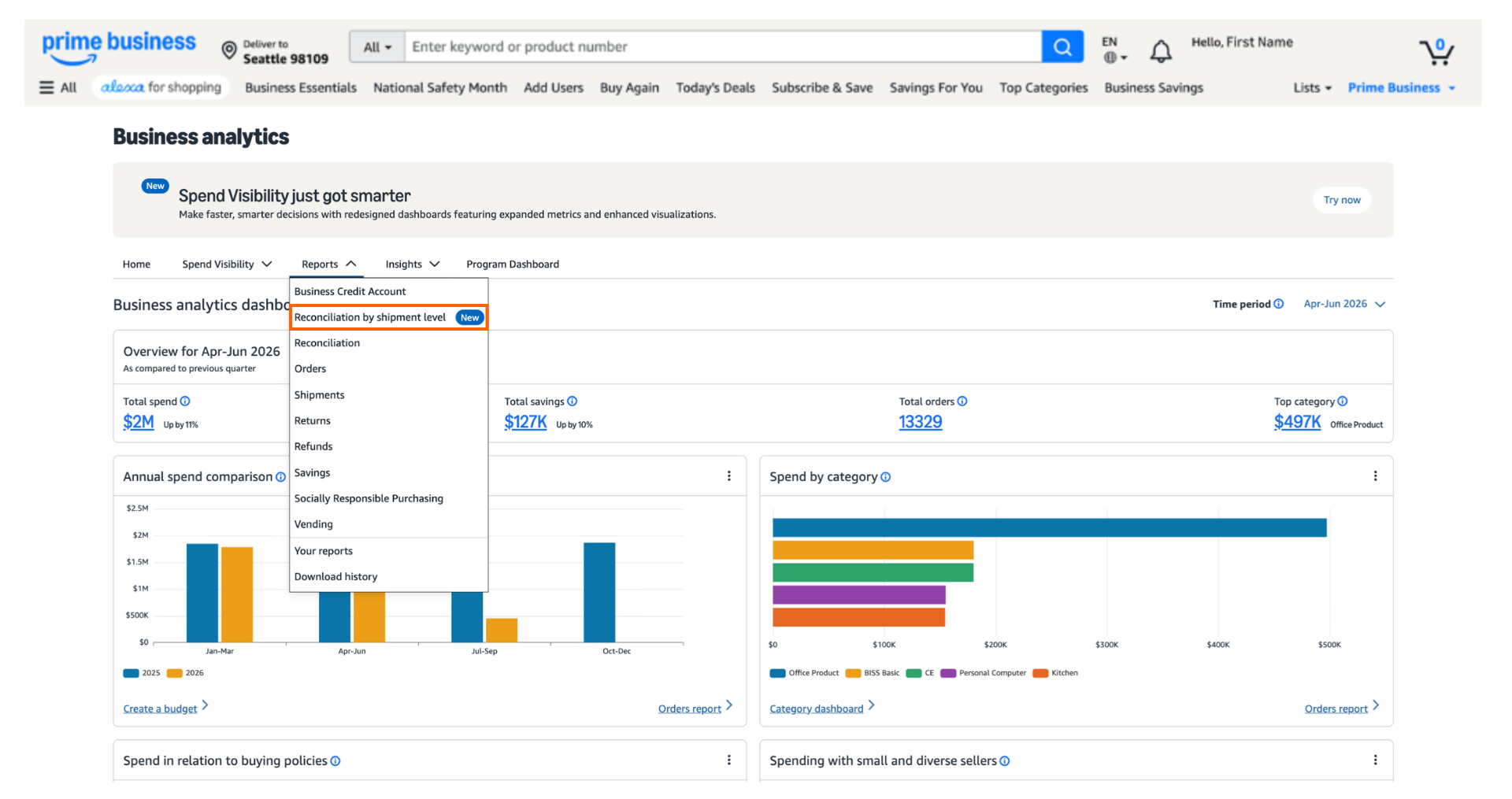
In the Reports dropdown, you'll find two reconciliation reports: Reconciliation, for reconciling by payment transaction, and Reconciliation by shipment level, for reconciling with shipment line-item detail.
Do I need to recreate my saved report templates?
Not right away. You'll still be able to access your old report templates until October 31, 2026. After that date, previously saved templates will no longer be available, and you'll need to recreate them in the enhanced report. Templates for other Amazon Business Analytics reports aren't affected.
Tips for creating report templates:
Start by identifying the columns your team uses every cycle (e.g., Charge Identifier, PO number, GL code, cost center).
Use Adjust Columns to add the new fields most relevant to your reconciliation process, such as invoice due date, shipment status, or UNSPSC product hierarchy.
Save the layout as a named template so every team member can reuse it.
If you run multiple reconciliation workflows (e.g., invoice vs. credit card), consider creating a separate template for each.
Do I still need to add Charge Identifier manually?
No. Charge Identifier is now a default column. In the current version, customers had to add Charge ID manually through Adjust Columns. The enhanced report shows it by default, which removes a repetitive step from every reconciliation cycle.
How the new reconciliation report helps accounts payable teams
Easily match transactions to orders
New product fields—ASIN, product title, and the full UNSPSC hierarchy—let you reconcile at the line-item level rather than the order level. Combined with Charge Identifier and Payment Reference ID, you can match each charge to the exact item and order it belongs to. That accuracy reduces disputes and speeds up approvals.
Reconcile invoice and credit card purchases in one place
This is the core value of the enhanced report. Now you can reconcile every Amazon Business purchase in one place, whether your business credit account, credit card, or both. Invoice fields such as statement number, invoice due date, and document status sit alongside payment and card data, so your team no longer switches between separate reports to close the books.
Build reports that fit your business
Organization-specific fields—GL code, department, cost center, project code, location, and up to 13 custom fields—carry over from the current version. Pair them with the new data categories through Adjust Columns to build a report shaped around your chart of accounts. Save that layout as a template to reuse it every cycle.
Get full pricing transparency
The pricing breakdown replaces the old single-amount field with unit price, item subtotal, shipping and handling, promotions and discounts, gift wrap fees, regulatory fees, other fees, tax rate, total tax, and net total. This transparency supports accurate three-way matching and makes it easier to verify what you were charged and why.
Track shipments and deliveries without a separate report
Shipment and delivery fields—ship date, shipment status, ship-from country, quantity, recipient name, shipping address, delivery status, and receiving status—are now built in. You no longer need to cross-reference the Shipments Report to confirm what arrived and when.
Reconcile returns and refunds completely
Return detail fields capture the refund reason, restocking fees, and return shipping fees, each with tax breakdowns. Paired with the Transaction Type field (charge, refund, or over-refund), your team can reconcile credits with the same precision as charges.
Close your books faster and more independently
By consolidating what previously required three or four separate reports—Reconciliation, Shipments, Orders, Refunds, and BCA—into a single comprehensive download, the enhanced report removes the need to manually join data across sources. Fewer manual steps mean shorter reconciliation cycles and less dependence on support to complete month-end close.
Getting the most from your report
The enhanced reconciliation report gives procurement and finance teams a single source of truth for every Amazon Business purchase. To get started:
Choose your report. Pick Reconciliation for payment-transaction matching or Reconciliation by shipment level for line-item detail.
Add the fields that matter to you. Use Adjust Columns to surface the new invoice, shipment, pricing, product, return, or seller fields your team needs.
Save your layout as a template. Reuse it each cycle so your reconciliation process stays consistent and fast.
With line-item detail, full pricing transparency, and invoice and credit card data side by side, your team can spend less time assembling data and more time on strategic work.
Get started with the new reconciliation report
FAQs
Was this helpful?




 United States
 India
India United Kingdom
 France
 Germany
 Spain
Spain Italy
Italy Canada
 Japan
Japan Mexico
 Australia


