
Passkeys on Amazon Business: fast sign-in, strong account security


Key takeaways
Signing in to your Amazon Business account is faster than with a traditional password, using your device's fingerprint, face, PIN, or QR code.
Because credentials never leave your device, passkeys are also more secure than a traditional password and resistant to phishing.
Passkey setup takes an estimated 2 minutes, making sign-in quick and easy for you and your entire team.
Logging in to your Amazon Business account just got faster and simpler than with traditional passwords. With a passkey, you log in using your device's fingerprint, face, or PIN—no password to remember, no codes to enter, and no extra steps. Setup takes about two minutes, and it works across your devices. Passkeys are quickly becoming the enterprise authentication standard, with 87% of organizations now deploying or piloting them. And as an added benefit, they also help protect your account from phishing and stolen passwords.
Why passkeys are faster than traditional passwords
For enterprise procurement teams, every unnecessary step in the login process adds up. Remembering complex passwords, resetting forgotten ones, and entering one-time codes disrupts the flow of work and pulls focus away from higher-value tasks. The problem compounds across large organizations, where password resets alone account for up to 50% of IT helpdesk costs—each one costing roughly $70 in fully loaded IT labor.
Passkeys remove that friction entirely. There's no password to remember, no code to find, and no extra step between you and your account. And according to the FIDO Alliance, passkey deployments also show a 77% reduction in help-center calls, freeing up IT capacity for higher-value work.
That speed and simplicity also closes one of the most common security gaps organizations face. Phishing is the initial cause in the majority of account takeovers, and traditional MFA methods like SMS codes and push notifications are becoming less effective against sophisticated phishing campaigns. Passkeys address this by design: because credentials never leave your device and are cryptographically bound to the legitimate site, there's nothing to steal, guess, or intercept. The credentials that were slowing your team down were also the ones attackers exploit most. Passkeys solve both problems at once.
What is a passkey?
A passkey is a passwordless way to log in. Instead of typing a password you have to remember, you use your device's own authentication—your fingerprint, face, or PIN.
Here's how it works in plain terms: Your device stores a private cryptographic key while the service stores a matching public key. When you log in, your device proves you have the private key without ever sending it over the internet. You never type or share the credential, which is exactly why passkeys resist phishing so effectively. There's nothing to steal, guess, or trick out of an employee.
This technology is built on FIDO2/WebAuthn standards—the same industry-standard approach adopted across major platforms and services. CISA classifies FIDO2/WebAuthn as the only widely available phishing-resistant MFA.
For your Amazon Business account, that means stronger protection with less friction. Your biometrics never leave your device, and Amazon doesn't collect or store your passkey data or biometrics.
Passkeys vs. traditional passwords
Traditional passwords have weaknesses that modern attackers can exploit:
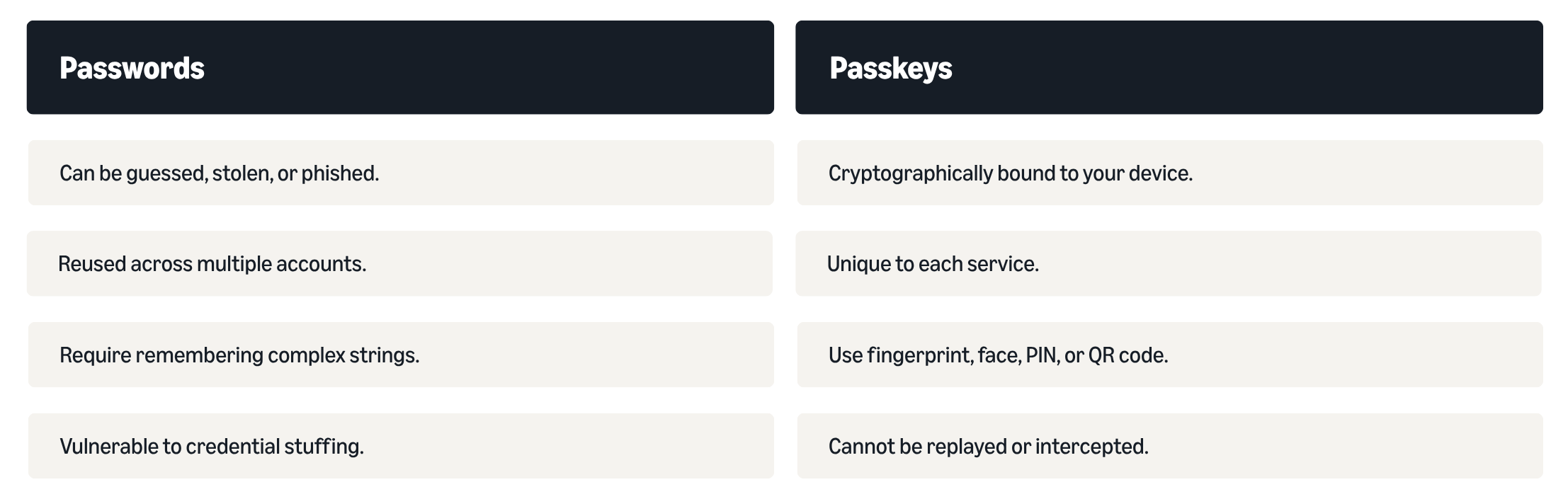
Passkey authentication works by cryptographically binding authentication to the legitimate domain and device, making it nearly impossible to reuse credentials. When a passkey authenticates, it verifies both that you are who you claim to be and that you're logging in to the legitimate site and not a phishing page designed to steal your credentials. And passkey use is on the rise. In fact, the FIDO Alliance reports 5 billion passkeys are now in active use worldwide.
Why now is the right time to set up passkeys on Amazon Business
Amazon Business is rolling out passkeys to make login faster and easier for customers across the US and Canada. Whether your account requires passkeys in the coming months or not, setting one up now means a smoother login experience from day one, and stronger protection built right in.
Getting started is simple, and teams can be up and running in minutes. Here's what to expect:
- Estimated time to complete is about two minutes. Go to Login & Security, select Set up passkey, and follow the on-screen steps.
- Each team member gets their own. Because business accounts often have multiple users, each person can register as a secondary user with their own passkey, so everyone keeps secure, individual access.
- Passkeys sync across your devices through your device's passkey provider, such as iCloud Keychain or Google Password Manager, so you're covered on your phone and laptop alike.
- A password stays available as backup recovery. If a device is lost or replaced, you keep access, and identity-verified support recovery is available if needed.
For administrators: simple setup, smooth rollout, and less IT overhead
If you manage your organization's account, here's the good news: rolling out passkeys is straightforward, and your team can be up and running in minutes. Each user sets up their own passkey in just a couple minutes, and the experience is simple enough that most people won't need hand-holding. The common concerns—lockouts, confused users, a surge in support tickets—are addressed by design, not an afterthought.
Passkeys are built to make enterprise rollout fast, simple, and low-effort for admins:
- Simple enrollment process. Each user sets up their own passkey in about two minutes. You can guide your team through enrollment without heavy IT lifting or complex provisioning workflows.
- Multi-device support. Since passkeys sync automatically through each user’s device provider, team members stay productive if they switch phones, add a laptop, or work across multiple devices.
- Built-in backup. With a password preserved as a backup recovery option, no one gets stranded during the transition. Identity-verified support recovery adds another safety net.
- Reduced support burden. Organizations that have deployed passkeys report significant improvements.
For procurement teams managing complex multi-user accounts, the result is a faster, smoother experience for every buyer, with fewer login barriers, less disruption to purchasing operations, and stronger account protection built right in.
For IT and security teams: easy rollout, fast login, and phishing-resistant authentication
For identity and security professionals, passkeys deliver faster, simpler authentication for every user, with phishing-resistant protection built right in:
- Industry-standard security. Passkeys are built on FIDO2/WebAuthn protocols—the same cryptographic approach used across major enterprise platforms. CISA recognizes this as the only widely available phishing-resistant authentication.
- No shared secrets. Unlike passwords stored in databases that can be breached, the private key never leaves the user's device. There's nothing to intercept, replay, or compromise in a server-side breach.
- Reduced attack surface. By eliminating passwords from the authentication flow, you remove the vulnerabilities that attackers most commonly exploit—credential theft, phishing, and password reuse.
- Compliance alignment. Passkeys provide the phishing-resistant authentication that many security frameworks increasingly require.
Set up your passkey in minutes and log in faster every day
Passkeys make every login faster, simpler, and less disruptive for your entire team. Your buyers get one-step access using the fingerprint, face, or PIN they already use. Your IT team fields fewer support requests. And your procurement operations keep moving without password-related interruptions. Built into all of that is stronger protection against phishing and stolen credentials—so you don't have to choose between speed and security.
Setup is straightforward, works across devices, and doesn't require IT to manage a complex rollout. If your account has an upcoming passkeys requirement, you'll already be ahead of it.
Ready to set up your passkey?
- Open your Amazon Business account by clicking Hello, Name in the top right menu.
- Select Login & Security from the menu.
- Select Set up passkey.
- Follow the on-screen steps.
In about just a couple minutes, your team can start logging in faster, with less friction and fewer interruptions to their work.
Set up your passkey
Was this helpful?




 United States
 India
India United Kingdom
 France
 Germany
 Spain
Spain Italy
Italy Canada
 Japan
Japan Mexico
 Australia


