
Spend Anomaly Monitoring updates: More access and smart integration


For organizations managing purchasing across large, distributed teams, catching irregular spending activity and manually auditing spend to ensure compliance shouldn't depend on a single person. Spend Anomaly Monitoring, a Prime Business Enterprise exclusive, was built to take the manual burden out of spend oversight, monitoring an organization's purchasing in real time and surfacing unusual activity before it becomes a compliance issue.
Today, we're announcing three updates that make Spend Anomaly Monitoring more accessible and more adaptable to how organizations actually operate.
What's new
1. Weekly digest emails
Spend Anomaly Monitoring now gives administrators the ability to opt in to weekly digest emails directly from within the dashboard. Each digest delivers a summary of current flagged anomalies. This gives teams a consistent, scheduled touchpoint for reviewing irregular purchasing activity without requiring daily log-ins.
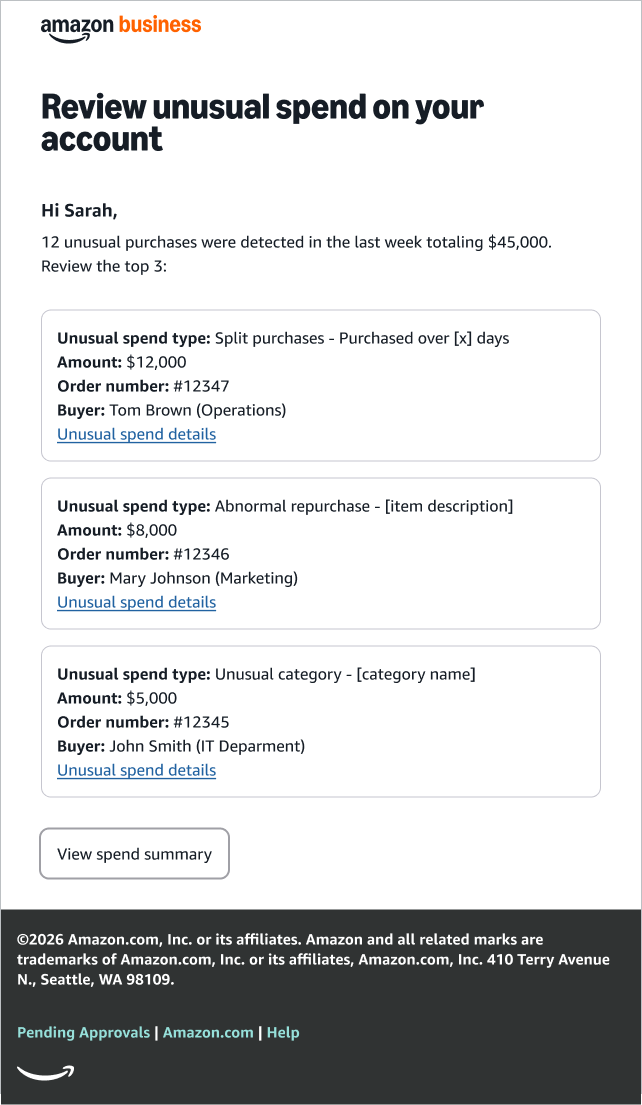
This update puts administrators in control of their oversight cadence. Whether team prefer to review anomalies in real time or consolidate that review into a weekly rhythm, they now have the flexibility to choose.
To opt into these emails, visit your dashboard.
2. Expanded finance and group-level administrator access
Customers routinely report that that spend oversight shouldn't be limited to top-level administrators. For organizations managing distributed purchasing across departments and business units, group and finance administrators are often the roles with the deepest context on what's normal (and what isn't) within their teams.
Previously, Spend Anomaly Monitoring was accessible only to account-level administrators. That created a bottleneck: anomalies flagged at the top of the organization had to travel back down to the people who could resolve them quickly.
With this update, finance and group administrators now have direct access to Spend Anomaly Monitoring. For high-volume organizations managing distributed spend reviews, this means:
Faster anomaly resolution: Administrators closest to the purchasing activity can act immediately, without routing through a central admin
Deeper contextual judgment: Group administrators who understand their department's purchasing patterns are better positioned to determine what's truly irregular
Greater distributed accountability: Compliance oversight scales with the organization, rather than concentrating in a single role
This is a meaningful step toward the "trust but verify" model that effective procurement teams depend on. It empowers the right people to act, while maintaining the organizational guardrails that keep spending in check.
Looking to extend to the right members of your team? There’s no further action on your end, as these roles are immediately granted access.
3. Amazon Business Assistant integration
Now, administrators can use Amazon Business Assistant directly from the Spend Anomaly Monitoring dashboard, or any enabled page within the Amazon Business experience, to ask basic questions about flagged purchases or anomaly trends. Often, administrators found it difficult to identify the root cause for an anomaly, requiring them to navigate through multiple pages and reports. This became a time-consuming and often fragmented experience.
Today, they can ask simple questions, like “Show me monthly trends in my anomalies,” or more simply, “What anomalies were detected last week.”
Administrators can use this new feature to better understand the anomalies flagged on their account, including by user.
Why it matters
Unapproved spending and purchasing irregularities remain among the most common compliance challenges for large organizations. These updates extend the value of Spend Anomaly Monitoring by making it more accessible, putting the right insights in the hands of the right people, on the right schedule.
More administrators with access means faster response times and better-informed decisions. Digest emails mean fewer gaps in awareness. Amazon Business Assistant brings it all together in an easier way to understand and take action. These updates were designed to help organizations maintain greater control over purchasing without adding friction for buyers.
Getting started
Spend Anomaly Monitoring is available for Prime Business members on the Enterprise plan. Not a Prime Business member? Learn more today.
Visit the Spend Anomaly Monitoring dashboard to take advantage of these updates today.
Was this helpful?




 United States
 India
India United Kingdom
 France
 Germany
 Spain
Spain Italy
Italy Canada
 Japan
Japan Mexico
 Australia


