
Buy Smarter and Save More with AI-powered Insights


Procurement and finance teams often struggle to find meaningful cost savings. The deep spend analysis required is a time-consuming, manual process of downloading files and searching for opportunities. By the time this analysis is complete, the insights are often already obsolete.
What if you could skip the manual work and get straight to how it addresses your bottom line? Savings Insights, a new AI-powered tool helps organizations with Prime Business Essentials, Small, Medium, and Enterprise plans automatically analyze purchase history, surfacing proactive, actionable cost-saving recommendations. This feature turns days of manual spend analysis into minutes of clear insight.
“At Amazon Business, we don’t just listen to our customers—we immerse ourselves in their challenges. Savings Insights is about more than just saving money; it’s about giving our customers the confidence to make smarter decisions, faster.”
- Stephanie Lang, Director and General Manager, Amazon Business
The challenge of manual spend analysis
For many organizations, finding the right data to drive buying for work is a constant struggle.. The process of identifying savings opportunities is often resource-intensive and requires specialized data analysis skills. Teams spend significant time exporting and crunching numbers from the past 12 months of purchasing data.
This reactive approach makes it difficult to capitalize on savings in real-time. Many businesses simply lack the bandwidth or expertise to perform this level of analysis consistently.
AI-powered savings recommendations
Savings Insights, an Amazon Business Analytics feature, uses AI to do the hard work for you. The system analyzes your historical purchasing patterns over the past 12 months to deliver tailored savings recommendations, helping you and your team make smarter buying decisions. This powerful tool is built to streamline your workflow and deliver immediate value.
Your savings snapshot
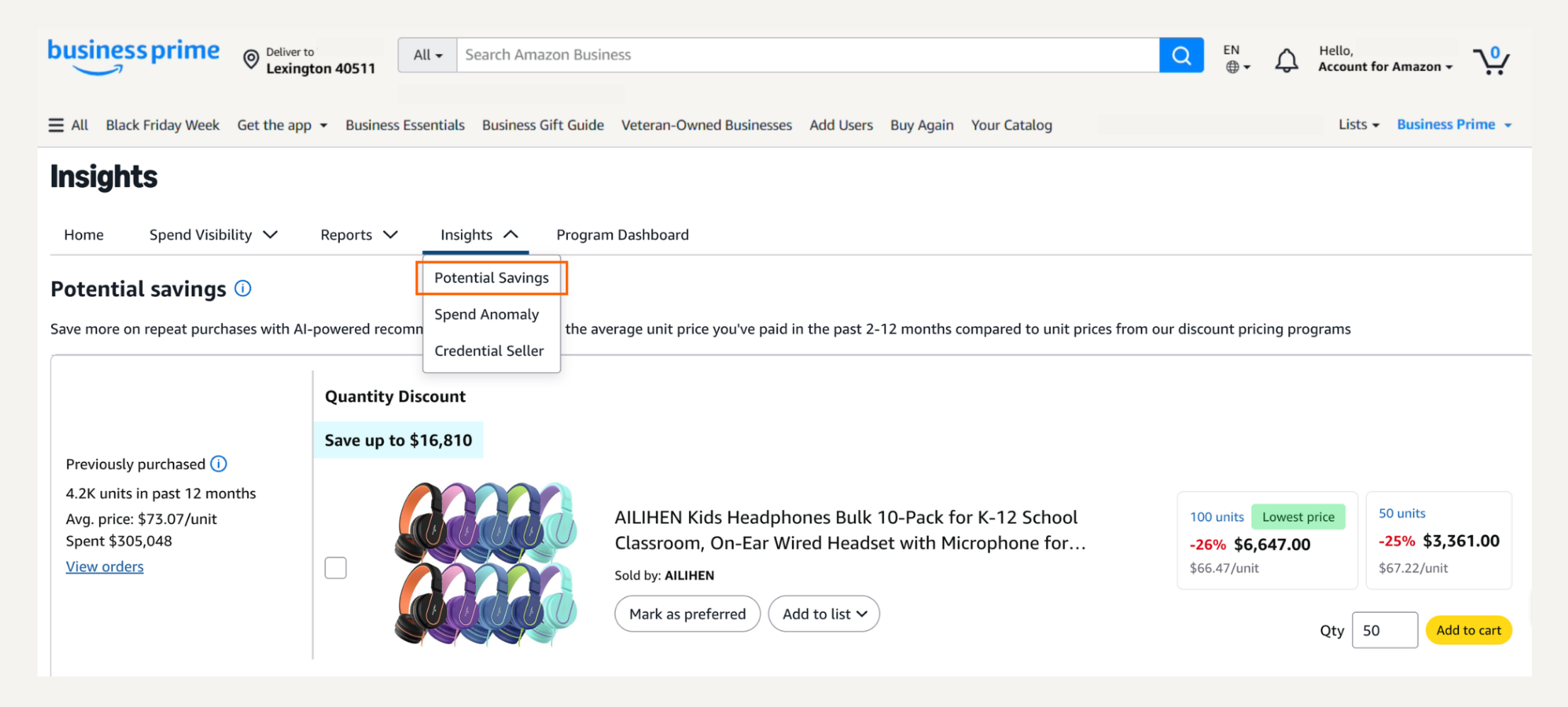
Within Savings Insights, you’ll see a prioritized list of savings recommendations. Each opportunity is sorted by its potential savings value, allowing you to focus on the highest-impact actions first. You no longer have to hunt for opportunities; they are presented to you in one convenient location.
For each recommendation, you can drill down into the details. You’ll see your complete purchase history for an item, including the number of units purchased, total spend, average price paid, and seller information. This transparency gives you the context needed to make confident, data-driven decisions.
One-click actions for instant savings
“Insight without action is just information. With Savings Insights, we’re reimagining how businesses approach spend analysis. Our goal is to provide customers with intuitive, AI-powered tools that turn data into actionable savings, helping teams focus on strategy rather than spreadsheets.”
- Vikram Ramadoss, Principal Product Tech, Amazon Business
Savings Insights makes it easy to act on recommendations with a single click:
- Set up Subscribe & Save: For items you purchase regularly, you can instantly create a subscription to lock in recurring delivery and discounts.
- Add to cart: Take immediate advantage of Quantity Discounts by adding the suggested bulk order to your cart.
- Mark as preferred: Designate a product as a preferred choice for your organization to support strategic spend.
- Add to a list: Organize and track potential purchases by adding items to a custom list.
Level-up your procurement strategy
With Savings Insights, you can shift from reactive data crunching to proactive, strategic cost management. Automate complex analysis so you and your team can focus on what matters most: making intelligent decisions that benefit your organization’s bottom line. Qualifying Prime Business members in Administrator and Finance roles can access Savings Insights by:
- Visiting your “Hello, Name” profile drop-down
- Selecting Business Analytics
- Within your Business Analytics dashboard, choose the Insights drop-down
- Select Potential Savings
Not a Prime Business member? Learn more about Prime Business plans and the exclusive features that come with membership.
Was this helpful?




 United States
 India
India United Kingdom
 France
 Germany
 Spain
Spain Italy
Italy Canada
 Japan
Japan Mexico
 Australia


