
Centralized and simple: A better way to manage Amazon Business users


Managing your account can come with its share of challenges, especially when it involves organizing users, roles, and groups. Our new, enhanced User Management experience is rolling out for Amazon Business customers globally—providing a simple, streamlined experience.
With this update, managing users is easier, faster, and more intuitive. Account administrators no longer need to switch between separate pages (such as the “People” and “Invitations” pages). Instead, everything you need is now centralized in one user-friendly hub called the “Users” page.
“As we innovate, our goal is to empower businesses with tools that simplify operations and save time," says Amazon Business director of technology and products Rajiv Bhatnagar. "The new User Management experience reflects our commitment to streamlining account administration, giving customers greater control and efficiency in managing their Amazon Business users.”
Here’s a closer look at these changes, how they solve some of the most common challenges for administrators, and how you can make the most of these new features to better manage your Amazon Business account.
What’s new with User Management?
The updated User Management experience is designed with simplicity and efficiency in mind. Whether you’re adding new users, assigning them to groups, or reviewing their roles, everything is now easily accessible from a single page in Business Settings.

Key features of the enhanced experience
1. Centralized user management
Everything needed to manage your users can now be found in one place. The new Users page consolidates the functionality of several pages (People, Invitations) into a single, streamlined interface.
2. Searchable, filterable user list
The Users page features a searchable and filterable table, displaying a wealth of information about all account users, including:
- Names
- Roles
- Group levels
- Status (active, invited, invitation expired)
- Last order data
If a user is assigned to multiple roles or groups, you can easily hover over the relevant column to view their full details.
3. Summary dashboard
At the top of the page, you’ll find a convenient dashboard that provides a snapshot of your account. This summary panel displays the number of active users, pending invites, and requests to join—specifically for the group you’ve selected.
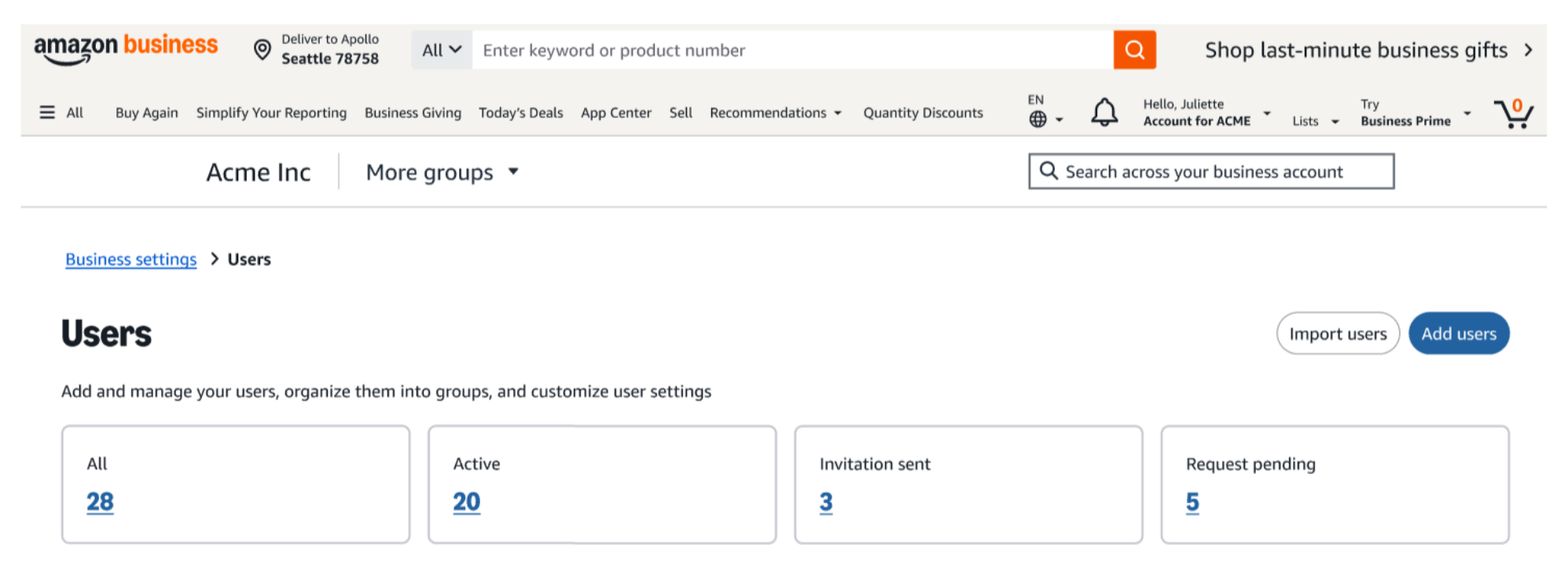
4. Streamlined invitation process
You can now invite new users through a pop-up, without having to leave the User Management hub. In the new experience, you can send email invitations or share a customizable invitation link. During this process, you can also assign roles and groups, ensuring you maintain account control while empowering your team with the right access.

5. Enhanced filtering options
Advanced filters help you narrow your user list, making it easy to find specific individuals or groups for better visibility.
Why it matters
The enhanced User Management experience brings big improvements that simplify the way you manage users within your Amazon Business account.
Simpler navigation
With everything in one place, managing users, roles, and groups is straightforward and efficient, saving you time and reducing complexity.
Improved visibility and control
Your user summary dashboard at the top of the page provides a quick, clear view of your account. By instantly showing active users, pending invites, and join requests for selected groups, you can make decisions faster with better user visibility. Powerful search and filter tools make it easy to locate specific users or groups. Which means less searching and more time to focus on the tasks that matter to you.
Streamlined invitations
Inviting new users is easier with pop-up windows that let you send email invites or share links directly—all right from your Users page. The ability to assign roles and groups during the invitation process ensures your new users are set up for success right from the start.
Explore the new User Management feature
Follow these easy steps to access and navigate this updated experience:
- Sign in to your Amazon Business account.
- Hover over Hello, [Your Name] and choose Business Settings.
- Locate the Users page under User Management.
- Explore your summary dashboard for an overview of your users, including at-a-glance counts of active users, pending invites, and join requests.
- Use the search bar or apply filters to quickly find specific users or groups.
- Add new users by clicking the Add users button at the top of the page. A pop-up window will guide you through the process of inviting users via email or shareable link.
- During this step, you can also assign roles, groups, or subgroups, ensuring each new user has the appropriate permissions from the outset,
- Review and manage users from the table. Click on any user to review their information, edit their roles, or remove them from the account.
- Download user information by generating a detailed CVS or Excel file for offline management.
Simplify user management
By combining all of your user management tools into one centralized page, the enhanced User Management experience on Amazon Business makes it easier to take control of your account. Whether you’re managing a small team or a large organization, the new experience simplifies adding users, assigning roles, and staying on top of invitations.
With the new User Management experience, you no longer need to switch between pages or search for invitations. Instead, you can focus on what matters most—streamlining operations and empowering smart business buying for your users.
Don’t see the new experience yet? Stay tuned as we roll this new feature out to customers in phases. The new User Management experience will be available for Amazon Business account administrators in the US, Canada, Mexico, United Kingdom, France, Italy, Spain, Germany, India, and Australia.
Explore the new User Management experience
Was this helpful?




 United States
 India
India United Kingdom
 France
 Germany
 Spain
Spain Italy
Italy Canada
 Japan
Japan Mexico
 Australia


